Reuse the training you already have
Turn PowerPoint text and pictures into editable lessons. Add video, quizzes and PDF resources instead of rebuilding every course from scratch.

Australian RTOs & training organisations
Create lessons in Course Studio, send a draft to your separately purchased LMS, then review and publish for learners. Track progress, collect evidence and keep the records auditors ask for.
LMS plans from $149/month AUD plus GST. Free Course Studio is not an LMS trial.
Turn PowerPoint text and pictures into editable lessons. Add video, quizzes and PDF resources instead of rebuilding every course from scratch.
See learner progress, overdue work, inactivity and marking queues. Trainers, assessors and employers each get the views relevant to their work.
Keep assessment evidence, competency decisions, workplace sign-offs, moderation, validation and change history together, with reports and exports.
For non-accredited training, track expiry, create renewal enrolments and retain previous evidence and certificates. Email and opted-in prepaid SMS support reminders.
This is the actual designer after importing an example workplace-safety deck. Each slide becomes a lesson with editable text and pictures; PowerPoint layouts and animations do not carry over.
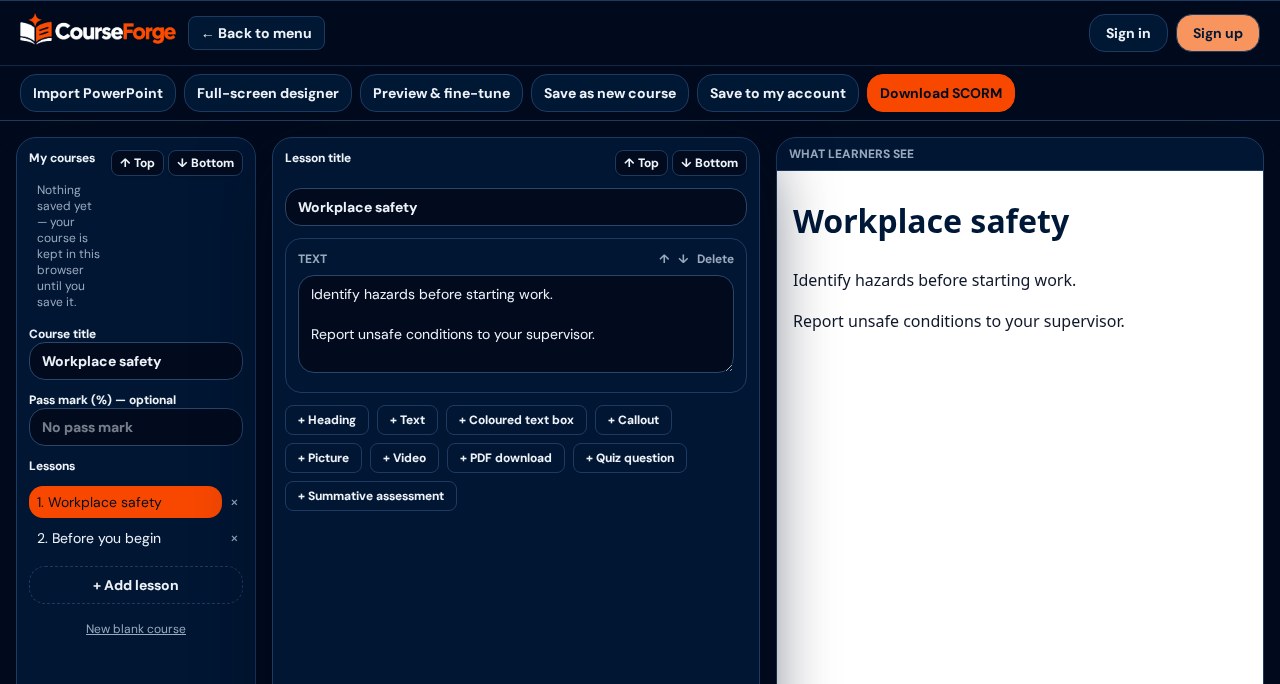
Import a .pptx, restyle lessons and add media or quizzes. Preview the learner experience.
Eligible LMS owners, admins and trainers use Send to LMS to create a draft, then review and publish it.
Enrol learners, track progress and review assessment evidence. Export reports when needed.
AVETMISS and USI remain in your student management system. CourseForge provides a REST API, signed webhooks and scheduled CSV exports, and we can build certified connectors for aXcelerate, VETtrak, Wisenet and Cloud Assess on request — contact us to discuss your integration.
CourseForge supports structured records and assessment workflows. No software makes an RTO compliant: meeting the RTO Standards remains your organisation’s responsibility. Exported packages are checked against common SCORM issues, not guaranteed compatible with every LMS.
Authoring
Arrange videos, PDFs, lessons and assessments into sections, then publish controlled course releases for learners.
Learners
Give learners courses, progress, due dates, results and support on any device, with all content in one player.
Assessment
Build multiple choice, true/false, written, oral, file-evidence, workplace, project and observation activities.
Evidence
Collect documents, photos, audio and video, add time-coded assessor comments, workplace hours and supervisor sign-off.
Competency
Map every task to performance criteria, record C or NYC with reasons, adjustments, RPL and credit transfer.
Trainers
See overdue, inactive and struggling learners, marking queues, attendance, announcements and support requests.
Operations
Separate learner, trainer, assessor, administrator and employer experiences keep work focused and records private.
Compliance
Keep automatic change history, moderation samples, trainer credentials, professional development and assessment rationale.
Reporting
Export progress, outcomes, attendance, at-risk learners and student-system data, with assessor quality indicators.
Completion
Issue printable course certificates and statements of attainment from recorded completion and competency outcomes.
Completion
Edit certificate wording, signature and styling, or upload a PDF or image template. Image templates support overlaid learner details; preview and test the final output, especially PDFs, before issuing.
SCORM
Play uploaded SCORM packages with a runtime that saves status, score, time and bookmarks per learner, resumes where they left off, and shows staff detailed tracking.
Integrity
Learner declarations, server-enforced time limits, extra time, one-question-at-a-time, ID checks and similarity comparison — with every integrity decision made by an assessor.
Workplace
Workplace supervisors confirm specific evidence is genuine with a signed statement, and get an email when a learner logs a task for sign-off.
Notifications
Automatic emails for enrolments, submissions, results, certificates, due dates and inactivity, with editable wording, a send log and personal preferences.
Quality
Schedule assessment validation with internal and industry panel members, complete checklist-based validation records with tracked actions, log industry consultation and spot performance criteria no question covers.
Improvement
A central improvement register you can fill from complaints, appeals, moderation, validation and audit findings in one click, with an open and overdue dashboard — plus learner and employer satisfaction surveys with results by course, cohort and trainer.
Marking
Conflict-of-interest blocking, independent second marking with a recorded final decision, marking on behalf, an AI-use log and a filterable audit trail you can export.
Assessment
Reusable question banks mapped to units and criteria. Each learner draws their own random set, with shuffled questions and options, while every mapped criterion stays covered.
Admin
Import learners and enrolments from CSV with error checks first, enrol or re-enrol whole cohorts, change due dates and issue certificates in bulk — plus a manager dashboard and saved reports emailed to your team on a schedule.
Renewals
Set validity and renewal windows, report upcoming expiry, and enrol learners in the current course release automatically or from the expiry report. Each renewal keeps earlier attempts, evidence and certificates intact. Email and opted-in prepaid SMS reminders flag expiry at 60, 30 and 7 days and on expiry.
Support
Manage learner help requests, feedback, complaints and assessment appeals with replies and tracked status.
AI assist
Draft learner feedback and flag possible evidence gaps while keeping every assessment decision with the assessor.
Integrations
Our REST API lets student management systems such as aXcelerate, VETtrak, Wisenet or Cloud Assess connect using secure API keys to create enrolments and pull learners, courses, completions, unit outcomes and certificates. Signed webhooks push changes instantly, and scheduled CSV exports arrive as secure links. Send SMS reminders through SMS Messenger.
Request a guided demo before choosing an LMS plan. CourseForge support uses hello@aisi.au; this is our current published contact address.
Request an LMS demo